Monday, March 28, 2016

Ampere v2.01

Ampere v2.01 has been published on Google Play.

Changes

  • 3 new languages (Japanese, Lithuanian, Albanian) 
  • Bug fixes 
This time Ampere got more stable with a few bug fixes. Also 3 new translations are in this release available.

Languages

For new users (after a fresh install) ampere chooses the system language automatically (or chooses the English language if no translation is available).

But when Ampere is already installed, this has to be made manually:
    Settings --> Basic settings --> Language


Get Ampere on Google Play
http://goo.gl/ybA6Qx

Tuesday, March 8, 2016

Ampere v2.00

Ampere v2.00 has been published on Google Play.

Changes

  • 5 display styles
  • Favorite style selector
  • Battery voltage in notification
  • Battery temperature in notification
  • Bug fixes

Choose your style

Material design is a fine thing, but it doesn't mean that every app should look the same. There are more than one approaches if it comes to design. To give the choice in the hand of the users Ampere now offers 5 different display styles. Every user can individually decide which style is his favorite and can set it with the star (in the right bottom corner) to stick with the selected design.


Notification enhancements

Ampere has now a redesigned notification information selector. It is now possible to select the information a user want to see in the notification in a more advanced way. The selectable information has been enhanced with the battery voltage and the battery temperature.


Get Ampere on Google Play
http://goo.gl/ybA6Qx


Tuesday, December 15, 2015

Ampere reached 1 million installs

One million app installs reached

I am very proud to announce that Ampere have achieved to get over one million downloads on Google Play Store.


Ampere in numbers:
  • 324 days (11.8 Months) to get the 1 million downloads
  • 34 600 ratings with an average of 4.4 on Google Play Store
  • localized in 39 languages
  • more than 1100 members on the Ampere Beta Tester community (G+)
  • more than 200 followers on Twitter
The 1 million installs wouldn't be possible without the nice users, the great translators and the many-many enthusiastic people (on G+ and XDA Developers) who helped to test and to improve the app.

Thank you all for this great success!

Get Ampere on Google Play
http://goo.gl/ybA6Qx


Sunday, November 29, 2015

Ampere v1.56

Ampere v1.56 has been published on Google Play.

Changes

  • Alert ringtone chooser added (Settings / Alert settings) 
  • Max. USB current detection added (Settings / Basic settings)
  • New measurement interfaces added
  • Bug fixes

USB-C cable checking with Ampere

If you have an USB-C device and you want to know, if your USB-C cable is an USB-C spec compliant cable, you can do it with Ampere. Here is the description how to do it.

Note

On Nexus devices is the measurement interface in Marshmallow (Android 6) unfortunately not working (always 0 mA). This is a firmware bug. Please use the "Old measurement method" which is still fully functional also in Android 6.


Get Ampere on Google Play
http://goo.gl/ybA6Qx


Sunday, November 15, 2015

How to test USB-C cables with Ampere

A new feature in the latest Ampere (v1.56) is the possibility to show the maximum possible USB current with the charger/cable/device combination (if this information is available in the device and if this option is switched on in the settings).

There is currently an USB-C cable discussion, whether the USB-C cables from various manufacturer are USB-C spec compliant (uses a 3A identifier resistor instead of the "Default USB Power" one) or not. Please read the posts from Benson Leung.

There are also some posts about how to detect if a cable is USB-C spec compliant or not. For example this post.

How to test your USB-C cable

You can check your USB-C cable with latest Ampere (v1.56) in this way:
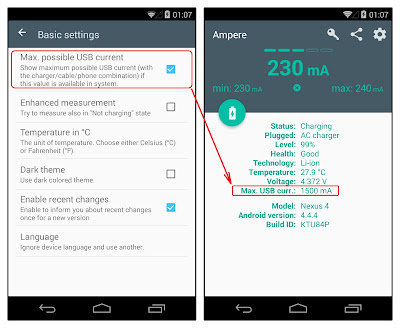
1.) Prerequisite: Your android device has an USB-C slot
2.) Your device shouldn't be charged fully to start
3.) Start Ampere (v1.56), and enable the "Max. possible USB current" option in the Basic settings
4.) Connect your phone to your computer with the USB-C cable to be tested
5.) Read the "Max. USB curr." (Maximum USB current) value

According to the latest USB-C discussions, this value should be never 3000mA if you are connected to a PC. If it is less than 3000mA then you are good to go.

Warning: Please always read your manufacturers advices and the manual of your device. Always use the cables and chargers, your manufacturer suggest.

** PROCEED AT YOUR OWN RISK! **
I am not responsible for any data loss, hardware damage, or bricked devices due to the use of this software! If you don’t agree, then you shouldn’t be installing this app, then uninstall it immediately!


Get Ampere on Google Play
http://goo.gl/ybA6Qx


Sunday, October 18, 2015

Ampere v1.55

Ampere v1.55 has been published on Google Play.

Changes

  • New app icon
  • Less permissions
  • Marshmallow release
  • Bug fixes

Note

On Nexus devices is the measurement interface in Marshmallow (Android 6) unfortunately not working (always 0 mA). This is a firmware bug. Please use the "Old measurement method" which is fully functional also in Android 6.


Get Ampere on Google Play
http://goo.gl/ybA6Qx


Sunday, July 12, 2015

Ampere reached 500 000 installs

Half million app installs reached

I am very proud to announce that Ampere have achieved to get over half million downloads at the Android Market.

Ampere needed 7 months to reach this. The app is localized in 39 languages and has more than 500 members on the Ampere Beta tester community.

The 500 000 installs wouldn't be possible without the translators and the many-many people (on G+ and XDA Developers) who helped to test and to improve the app.

Thank you for helping!

The users were also very active. The app got more than 16 800 ratings and 4 300 reviews from the users. The average rating is 4.4. I want also to thank to everyone used Ampere and made possible this happening.

Thank you!

Get Ampere on Google Play
http://goo.gl/ybA6Qx